Templates
Templates serve as blueprints for all your products, whether you use our pre-defined industry templates (textiles, steel, furniture, etc.) with mandatory data fields or create your own from scratch.
Steps
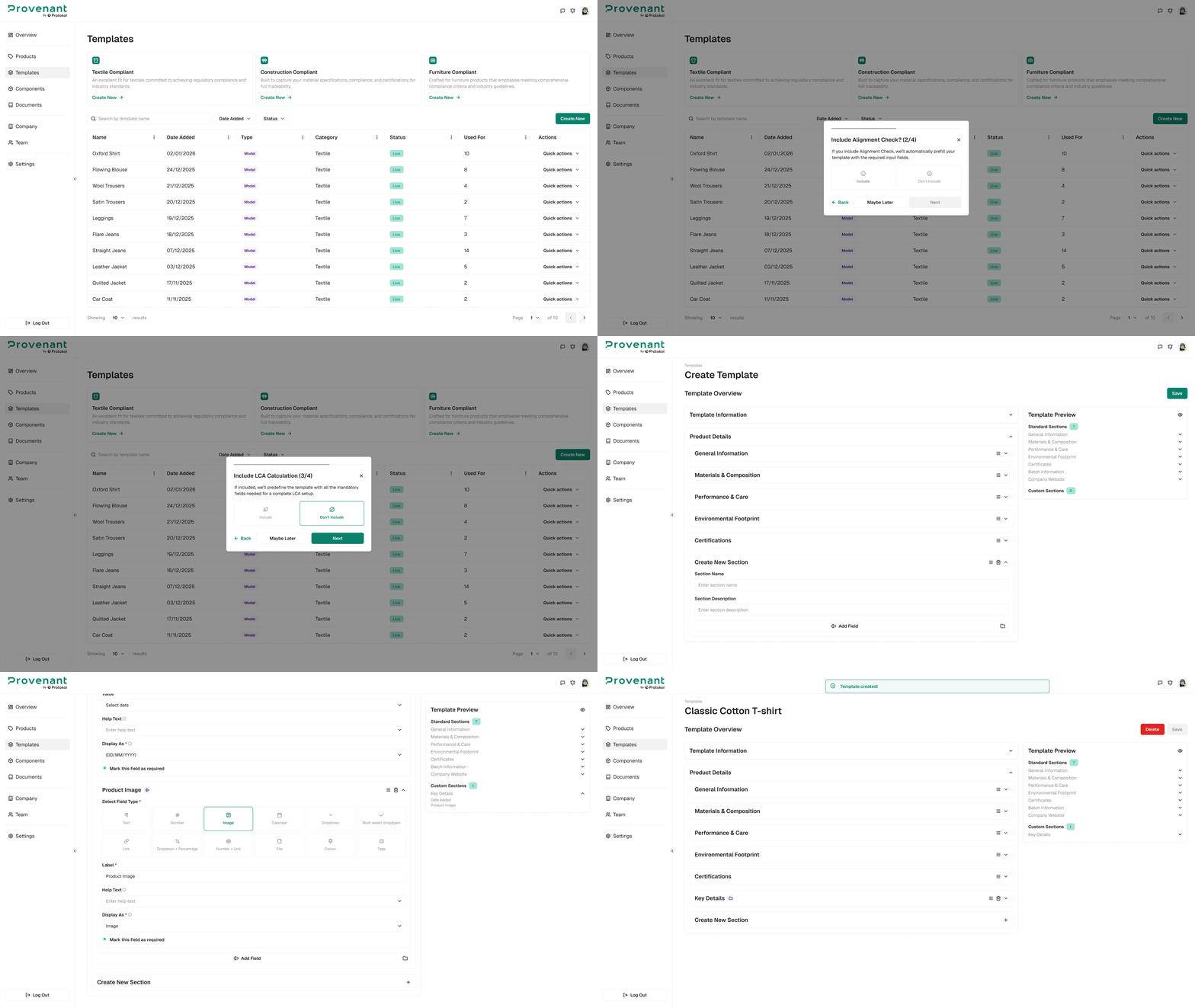
- Open
Templatesfrom the left navigation menu. - Click Create New.
- Select a
Template Category. - Choose whether you want to enable
Alignment Check. - Choose whether you want to enable
LCA Calculation. - Select your preferred
Builder Type. Reviewthe existing sections.- To add a new section, click
Create New Section. - Click the
New Fieldbutton. - Select a
Field Typeand enter the required data. Repeatthis process to add morefields, or createsubsectionswithin the same section.- Preview your template using the
Template Previewpanel on the right. Publishthe template to use it immediately, orSave as Draftto edit later.
tip
Enabling Alignment Check lets us visually guide you in real time to ensure your product meets EU DPP requirements and its readiness levels.
Templates catalog
Templates define which sections and fields appear when creating a model. Choose a template that fits your product category and compliance needs.
| Template name | Typical industries / use cases | Key sections enabled |
|---|---|---|
| Textile Compliant | Apparel, textiles | General Information, Materials & Composition, Performance & Care, Environmental Footprint, Certificates, Batch Information, Company Website. |
| Construction Compliant | Construction products | General Information, Materials & Composition, Performance & Care, Environmental Footprint, Certificates, Batch Information, Company Website. |
| Furniture Compliant | Furniture products | General Information, Materials & Composition, Performance & Care, Environmental Footprint, Certificates, Batch Information, Company Website. |
| Toys Compliant | Toy products | General Information, Materials & Composition, Supply Chain, Design & Repairability, Safety & Performance, Environmental Footprint, Circularity & End-of-Life, Batch Information. |
tip
Template availability and sections can vary by workspace. Check with your admin if you need additional templates.