Notifications
Use Notifications to configure user-level in-app and email alerts. A notification bell in the header provides quick access to recent updates, and the Notifications screen shows the full history. The platform supports multiple configurable notification types per user, grouped into Product & Batch Updates, Templates, Compliancy & Regulatory Alerts, Account, Security & Access, and System & Notifications. Some types appear only when a related integration (for example, Salsify) is active.
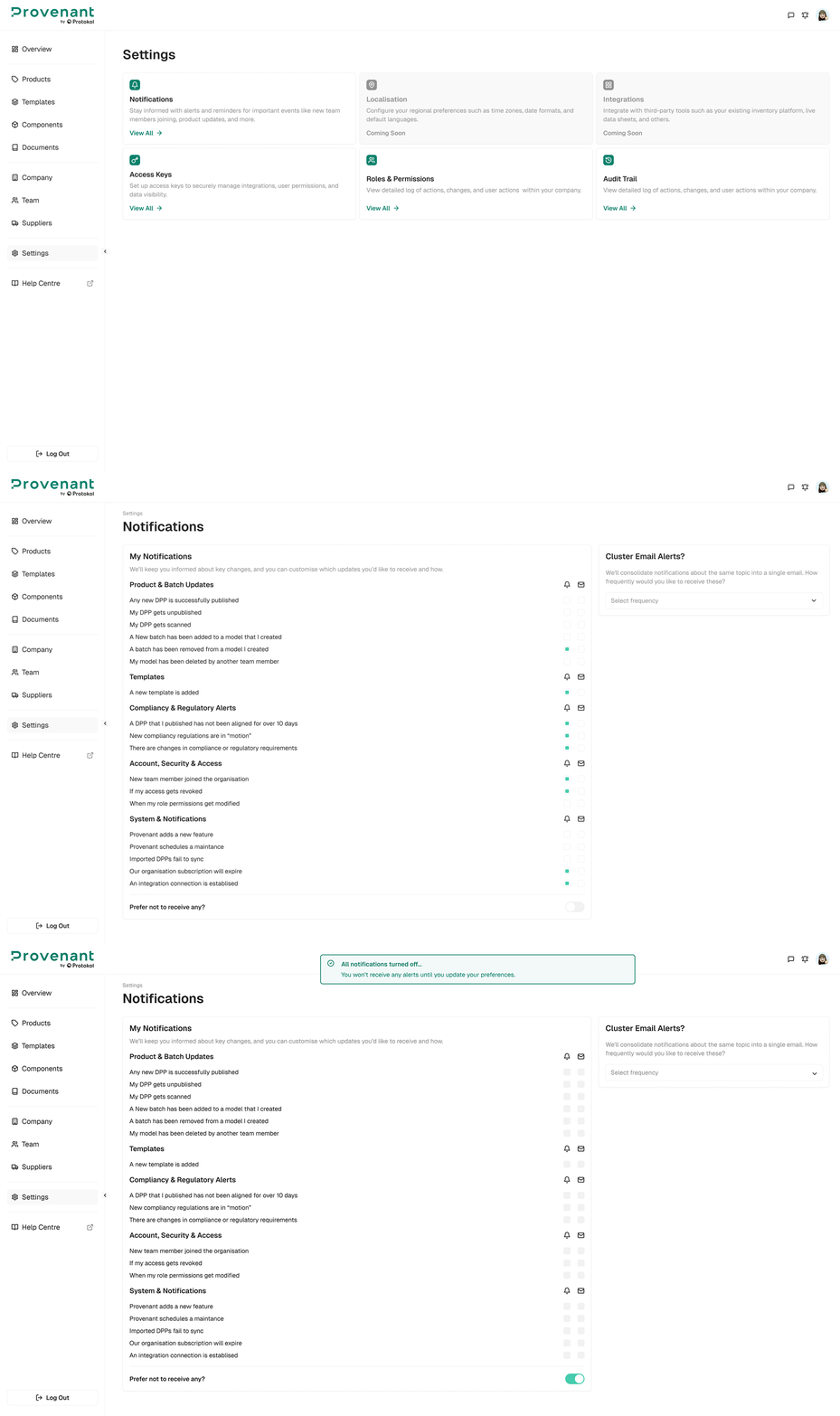
Where to find it
Go to Settings › Notifications, then configure your preferences in My Notifications. To see all your notifications, open the Notifications page from the notification bell.
Configure notifications
- Open
Settings›Notifications. - For each notification type, select or clear the
In-app(bell) andEmail(mail) check boxes. Changes save automatically. - To stop all notifications, turn on
Prefer not to receive any?.
Enable email notifications for time-sensitive workflows (e.g., supplier review requests), and keep in-app enabled for day-to-day activity tracking.