Publish or Unpublish a DPP
Publishing makes your model’s DPP visible through its QR code and in any linked applications.
You can unpublish the model at any time to hide it while preserving the data.
Steps
- Open the
Model Overviewfor your product. - In the
Digital Product Passportpanel, clickPublish(orUnpublishif already live). - Confirm your action in the dialog box (
Gotcha, Publish It!orUnpublish Product). - Wait for the confirmation message “Passport published” (or “Passport unpublished”).
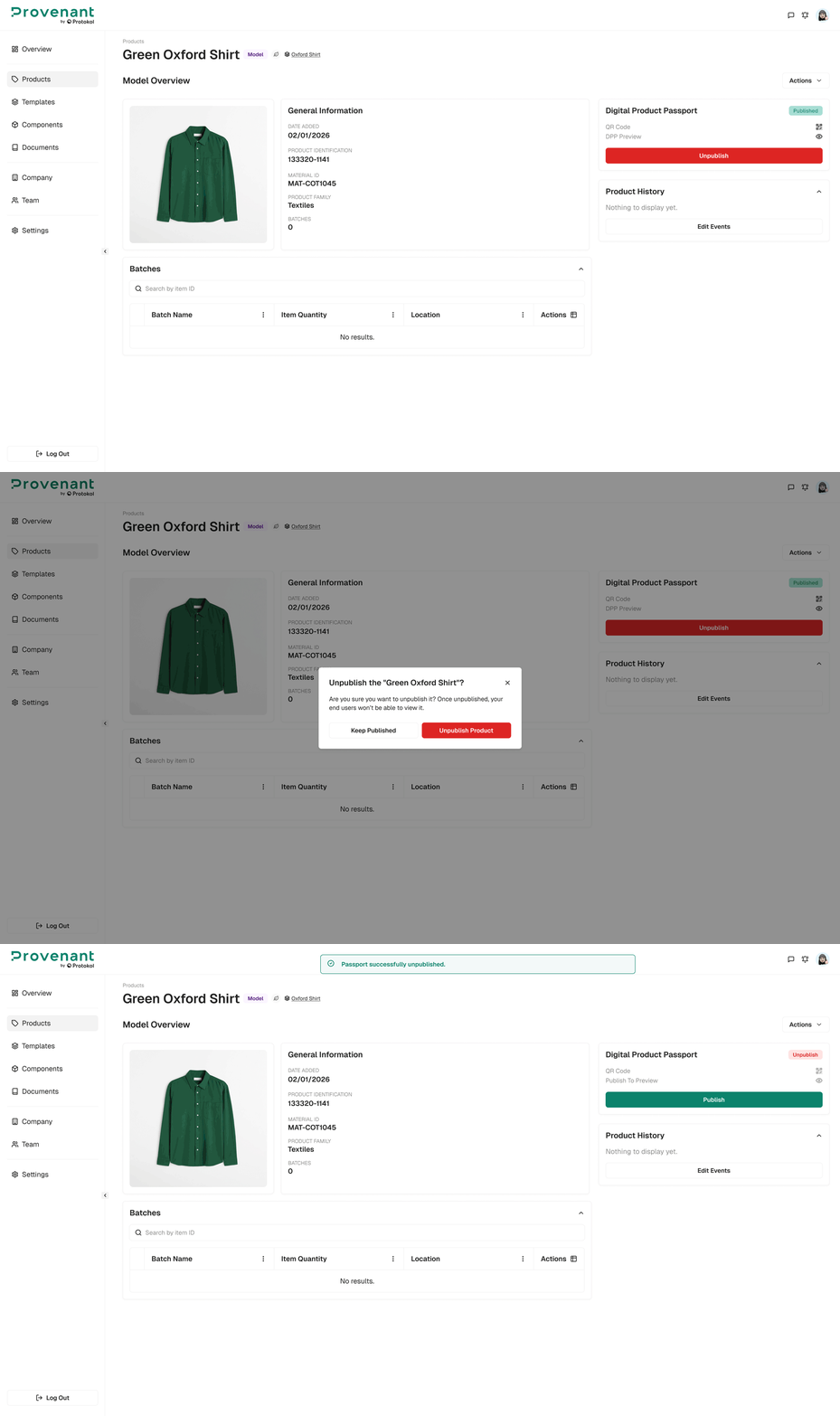
Re-publishing keeps the same QR code and DPP link.
Republish an out-of-sync DPP
When you edit a published model, the live DPP does not change automatically. The DPP gets an out-of-sync badge. To update the live version, click Republish, and then click Republish DPP in the dialog.
You can also republish from the Products list (Quick Actions › Republish DPPs) or from the Unsynced DPPs widget on the Overview page.
tip
If you need a new QR code (for example, for a new version or product revision), clone the model and publish the clone.
Common Issues
- Changes not visible after editing: Republish the DPP. See Republish an out-of-sync DPP.